
Moved to a new house, shifted cities for work, or need to correct a spelling error in your residential details? Among all demographic fields, residential address is the only detail that the Unique Identification Authority of India (UIDAI) currently allows you to modify from home. You can complete an online aadhaar address update in just a few minutes by logging into the official My Aadhaar Uidai Portal using your registered mobile number and OTP.
Whether you have an official Proof of Address (PoA) document in your own name or want to update your address using a family member’s card (such as your spouse, parents, or guardian) through the Head of Family (HoF) facility, the entire workflow is 100% paperless. Below is a complete step-by-step guide covering the online procedure, accepted document list, official ₹ 75 fee rules, and instructions on how to track your Service Request Number (SRN).
Log in with your registered mobile OTP to change your residential address online using a valid Proof of Address (PoA) or Head of Family (HoF) consent.
✓ Official Fee: ₹75 (Non-Refundable) | ✓ Mobile OTP RequiredEssential Requirements for Online Aadhaar Address Update
Before starting your application on the portal, make sure you meet these basic criteria to avoid rejection:
- Active Registered Mobile Number: Online login and OTP verification are mandatory. If your mobile number is not linked to your card, you cannot update your address online and must visit an Aadhaar Seva Kendra.
- Original Scanned Proof of Address (PoA): You must upload a clear, color scan (in PDF or JPEG format, under 2 MB) of an original valid document. Photocopies or black-and-white scans often get rejected during backend verification.
- Exact Name Match: The Proof of Address document you upload must carry your exact name as printed on your Aadhaar card.
- Applicable Fee: UIDAI charges a standard processing fee of ₹ 75 (inclusive of taxes) payable online via UPI, Debit Card, Credit Card, or Net Banking.
Method 1: Step-by-Step Aadhaar Address Update Using Valid Document (PoA)
If you have a valid address proof document in your own name, follow these steps to submit your request:
- Log in to the Portal: Visit the official My Aadhaar dashboard (
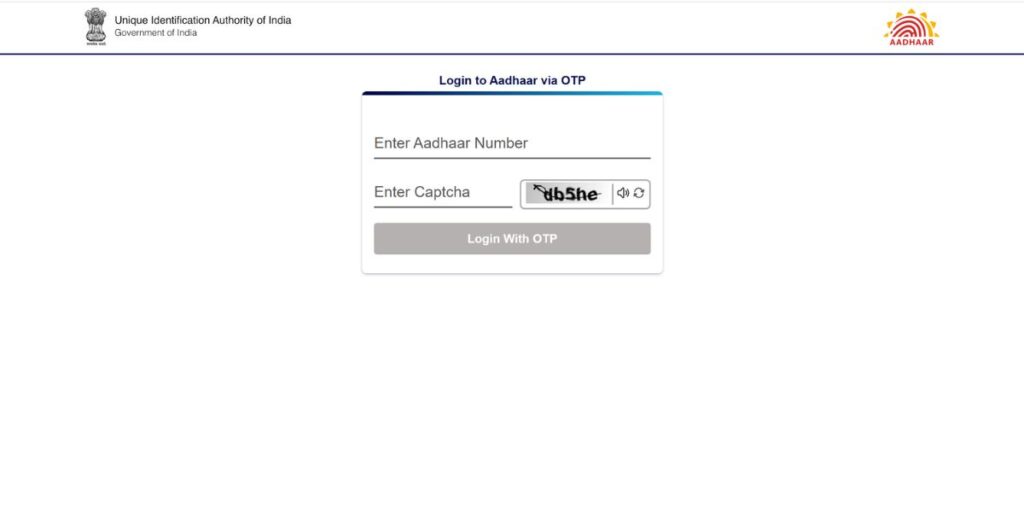
myaadhaar.uidai.gov.in), click on the Login button, enter your 12-digit Aadhaar number and Captcha, and verify using the 6-digit OTP sent to your registered mobile number.
- Select Address Update: Once inside the dashboard, click on the “Address Update” tab (or select Document Update / Update Aadhaar Online).
- Choose Update Option: Click on “Update Aadhaar Online”, read the brief instructions, and select “Address” from the list of demographic fields, then click Proceed to Update Aadhaar.
- Enter Your New Address: Your current residential address will be displayed on the screen. Scroll down to the “Details to be Updated” section:
- Enter your Care Of (C/o) details (Father’s, Mother’s, or Spouse’s name, if desired).
- Type your House/Building/Apartment No., Street/Road/Lane, and Area/Locality/Sector.
- Enter your 6-digit PIN Code—the portal will automatically populate your State, District, and Village/Town/City.
- Select your official Post Office from the drop-down menu.
- (Note: The portal automatically translates your English entries into your local regional language. If any regional spelling is slightly off, use the virtual keyboard to adjust it).
- Upload Supporting Document: Select the exact Document Type from the drop-down list (e.g., Electricity Bill, Passport, Voter ID, or Bank Passbook). Click View Details & Upload Document to attach your color-scanned PDF or JPEG file (ensure the progress bar reaches 100%).
- Preview & Confirm: Carefully check the preview of your newly entered address in both English and the local language. Tick the two confirmation checkboxes and click Next.
- Pay the ₹ 75 Fee: Choose a payment gateway, select UPI, QR Code, or Card payment, and complete the ₹ 75 transaction.
- Download Acknowledgement Slip: Once the payment succeeds, a downloadable PDF receipt containing your 14-digit Service Request Number (SRN) will be generated. Save this receipt safely.
Method 2: Aadhaar Address Update Without Documents (Head of Family / HoF Method)
What if you recently got married and moved to your spouse’s house, or you are a student/dependent living with your parents and do not have any utility bill or address proof in your own name? UIDAI allows you to perform an aadhaar address update using the Head of Family (HoF) facility.
How the Head of Family (HoF) Process Works:
| Requirement | Details for HoF Address Update |
| Who Can Be a Head of Family? | Father, Mother, Husband, Wife, Legal Guardian, or Adult Sibling/Child. |
| Mandatory Requirement | Both the Applicant and the Head of Family (HoF) must have their mobile numbers registered with Aadhaar. |
| Proof of Relationship Document | Marriage Certificate, Birth Certificate, Ration Card, Passport, Marksheet with parent’s name, or UIDAI Standard Self-Declaration Form signed by the HoF. |
| Address Assigned | The exact address printed on the HoF’s Aadhaar card will be copied to the applicant’s Aadhaar card. |
Step-by-Step HoF Update Procedure:
- Applicant Logs In: Log in to the My Aadhaar portal using the Applicant’s Aadhaar number and OTP, go to Address Update, and select “Head of Family (HoF) based Aadhaar Update”.
- Enter HoF Details: Enter the 12-digit Aadhaar number of the Head of Family ( only the number is entered; the system automatically fetches their address in the background). Select your Relationship with the HoF.
- Upload Relationship Proof: Upload a valid Proof of Relationship document (or the official UIDAI HoF Self-Declaration form filled and signed by the family head) and pay the ₹ 75 fee.
- HoF Approval (Crucial Step): An SMS containing the SRN is sent to the Head of Family’s mobile number. The Head of Family must log in to the My Aadhaar portal using their own Aadhaar number within 30 days, click on “My Head of Family (HoF) Request”, enter the SRN, and click Accept to give consent.
- Once the HoF approves the request, UIDAI processes the address change within a few working days.
List of Acceptable Proof of Address (PoA) Documents (2026)
To ensure your aadhaar address update is approved on the first attempt, only upload one of the following officially recognized documents:
- Indian Passport (Valid and unexpired; can also be used for spouse if spouse’s name is endorsed)
- Voter ID Card (EPIC) or e-EPIC issued by the Election Commission of India
- Ration Card / PDS Photo Card / e-Ration Card
- Bank Account Statement or Passbook (From a Public Sector Bank, Scheduled Commercial Bank, or Post Office Savings Account—must be stamped, signed, and include a photograph if passbook, or recent statement within 3 months)
- Electricity Bill (Prepaid or Postpaid, not older than 3 months)
- Water Bill or Piped Gas Connection Bill (not older than 3 months)
- Telephone Landline / Postpaid Mobile / Broadband Bill (not older than 3 months)
- Property Tax Receipt (Not older than 1 year)
- Registered Sale Deed / Gift Deed or Registered Rent, Lease, or Leave & License Agreement (Issued by the Sub-Registrar Office)
- Government Photo ID Card / Service Identity Card or Allotment Letter of Accommodation issued by Central/State Govt. or PSU
- Marriage Certificate issued by the Government (containing address)
- ST / SC / OBC Certificate or Domicile / Resident Certificate issued by Central or State Government (containing address and photograph)
- UIDAI Standard Certificate Format issued by an MP / MLA / MLC / Municipal Councillor / Gazetted Officer (Group A or B) / Village Panchayat Head or Mukhiya (must be properly stamped with cross-signature across the resident’s photograph)
(Important Note: Ordinary notary rent agreements on ₹ 100 stamp paper that are not registered with the Sub-Registrar Office are frequently rejected by UIDAI verifiers).
How to Track Status & Download Your Updated Card
After submitting your application and paying the ₹ 75 fee, UIDAI typically takes 3 to 10 working days (and a maximum of 30 days) to verify your uploaded document.
- Visit our dedicated Check Aadhaar Status guide to track your 14-digit SRN (Service Request Number).
- Once the progress bar moves from Validation Stage to Completed, your new address is immediately updated in the central database.
- You can then visit the Aadhaar Download page to get your updated e-Aadhaar PDF free of cost, while a physical copy is also dispatched to your new residential address via India Post.
Frequently Asked Questions (FAQs)
-
How many times can I update my address in my Aadhaar card?
Unlike Name (allowed twice in a lifetime) and Date of Birth or Gender (allowed only once), there is no limit on how many times you can perform an aadhaar address update. Whenever you relocate to a new house or city, you can update your address online.
-
Can I change my Father’s Name or Husband’s Name in Aadhaar online?
Yes! Today, the Father’s Name or Husband’s Name is not treated as a separate identity field—it is part of the “Care Of (C/o)” field inside your Address block. When you apply for an online address update, simply type
C/o: [Husband's Name]orW/o: [Husband's Name]in the Care Of box at the top of the address form—you do not even need a marriage certificate if your Proof of Address document is already in your name. -
Why was my online address update rejected with “Invalid Document?
Most rejections happen because users upload a screenshot, a black-and-white photocopy, a utility bill older than 3 months, or an unregistered rent agreement. Always scan the original color document clearly showing all four corners and ensure your name on the document matches your Aadhaar card.
-
Can I update my Name, Date of Birth, or Mobile Number online along with my Address?
No. Currently, UIDAI has discontinued online updates for Name, Date of Birth, Gender, Biometrics, and Mobile Number on the self-service portal. Only Address Update and Document Update (PoI/PoA re-validation) can be done online from home; for all other changes, you must visit an offline Aadhaar Seva Kendra.